Member emails
The emails Copia sends for you, how to turn them on or off, and how to send from your own domain.
Copia emails members at the right moments: when they join, before pickup, when they’re billed, when something changes. Every email uses your farm name, logo and colours, and replies go to your contact email.
Choose which emails go out
Go to Copia → Settings → Notifications. Each email has an on/off switch and a Send test button that sends a copy to you.
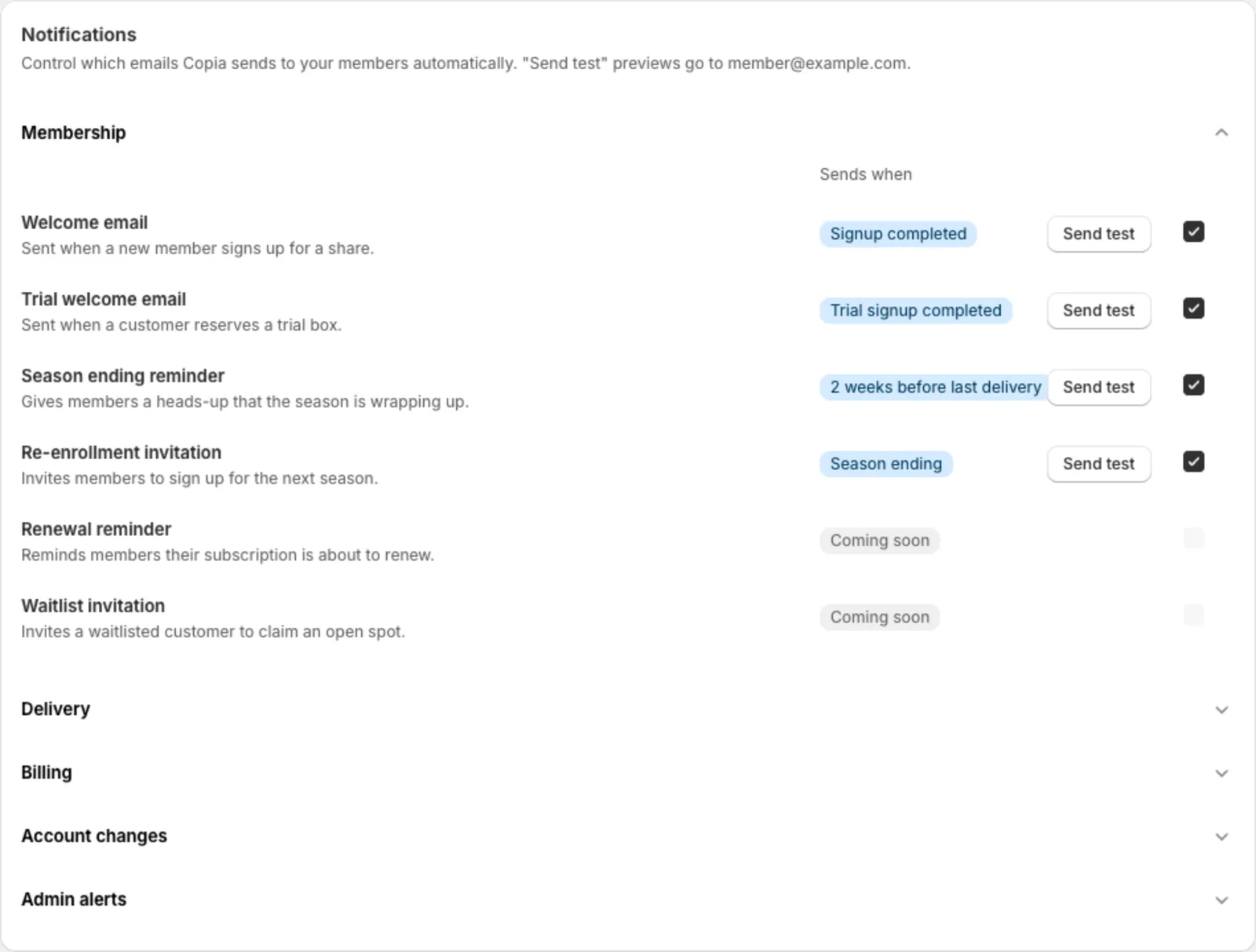
Membership
- Welcome email: when someone signs up
- Trial welcome email: when someone reserves a trial box
- Season ending reminder: a heads-up two weeks before the last delivery of a seasonal (not year-round) season
- Re-enrollment invitation: invites members back for next season. It only goes out when you click Re-enroll invite on the Seasons page.
- Renewal reminder: two weeks before a member’s automatic renewal, with their next dates, the price, the charge day and a Don’t renew button. It’s always sent, since members are told at checkout they’ll get it, so it has no on/off switch.
- Renewal waiting on dates: when a member who renews automatically has too few upcoming dates for their next boxes. It’s sent once to the member, and once to your farm’s contact email so you know to add dates.
Delivery
- Pickup reminder and Delivery reminder: 48 hours before, 24 hours before, or the morning of. You choose.
- Delivery notification (“what’s in your box”): sent when you click Send delivery notifications on a delivery date in Harvest Planning. The timing option in Settings doesn’t send it automatically yet. It goes to everyone with a box that day, including members who paused or cancelled after the box was locked. When swaps are on, it has a Swap an item before… button with the member’s cutoff date, like “Swap an item before Sat, Oct 10”, that opens the member portal. If you send it after that delivery has locked, the button is left out.
- Delivery moved: when you save a seasonal season’s dates or a location’s own dates and a member’s next delivery moves later, they get “Your [farm] pickup moved to [date]”, with the new date and the old one. Home delivery members read “delivery” instead of “pickup”. It always goes out, and only when the next box moves later (not earlier, and not for boxes they skipped or paused themselves).
- Box delivered (“Your box is here”): sent when a driver taps Mark as Delivered on their route. It shows the delivery address and that member’s own box: their size, swaps and add-ons, not the full harvest list. It ends with a Manage my membership button. Clicking Mark complete on a route doesn’t send it.
Billing
- Payment failed: when Copia couldn’t create a member’s bill during a billing run
- Card expiring: about 30 days before a member’s saved card expires, “Your card for [farm] expires soon”, with an Update card button that opens their store account. It’s sent once per card, and only if they still have boxes after the card expires. It shows on their timeline as Card expiring.
- Billing confirmation: a receipt sent when Copia charges a member’s saved card. Members who pay an invoice get Shopify’s own receipt instead. See Billing members.
- Ask to save card: “Set up automatic payments with [farm]”, sent only when you click Ask to save card on the Members page, so it has no switch here. See Ask members to switch.
Account changes
- Confirmations when a member pauses, skips or unskips. The pause email’s subject is “Your [farm] deliveries are paused”, with a Resume deliveries button.
Admin alerts (sent to you)
- Member cancelled, Pay-at-pickup signup, and Online signup
Scheduled emails go out at 8:00 AM in your farm’s timezone (Settings → Farm timezone). Dates in member emails follow your Date format (Farm settings).
Link to your social pages
Add your Instagram, Facebook, TikTok or YouTube page and it’s linked at the bottom of every email Copia sends your members, under your contact details. Networks you leave blank don’t show, and if you add none, your emails look the same as before.
Set them up in Settings → Social links (Farm settings), then use Send test on any email to see how they look.
Emails to you and your drivers don’t include the links. Neither do Shopify’s own invoices and receipts, because Shopify sends those.
One-off messages
To message everyone getting a box on a certain day, open the date in Harvest Planning:
- Send delivery notifications: this week’s box contents, plus an optional note and recipe link
- Email members: anything you like, such as a change of pickup spot or a farm update. Use Send test to me first.
To invite a whole season back, use Re-enroll invite on the Seasons page. To ask members who pay by invoice to save a card, use Ask to save card on the Members page (how).
Send from your own domain
By default, emails come from Copia’s address with your farm’s name. To send from your own domain (like hello@yourfarm.com):
- In Settings → Email sending, enter a Sending domain, like
mail.yourfarm.com, and click Connect domain. - Copia shows a few DNS records. Add them where your domain is managed (GoDaddy, Squarespace, Cloudflare…).
- Click Check verification. It can take a few minutes up to a few hours.
- Once it says Domain verified, choose the From address members will see.
Tip: Sending from your own domain makes it less likely your emails end up in spam.